Norse Subscriptions help
Prepaid plans and their shipping
Let customers pay once for several deliveries, and choose what they are told about shipping.
A prepaid frequency lets a customer pay once for several deliveries, for example three monthly deliveries in one payment. You set it on a frequency in a plan under Plans. It suits gift subscriptions and customers who prefer fewer charges.
A prepaid frequency sits in a plan beside the ordinary ones, so the same product can be offered both ways.
Before you start
You need a plan. See Create a plan.
Make a frequency prepaid
- Open the plan under Plans.
- Under Frequency, press a line to open it, or press Add frequency for a new one.
- Set Deliver every, for example 1 month.
- Under Payment, choose Prepaid, 3 deliveries or another number: 2, 3, 4, 6 or 12 deliveries.
- Under Shipping, as customers are told, choose Calculated at checkout, Included in the price or On top of the price. With On top of the price, you can also write the Shipping per delivery.
- Set the discount as for any frequency.
- Press Save.
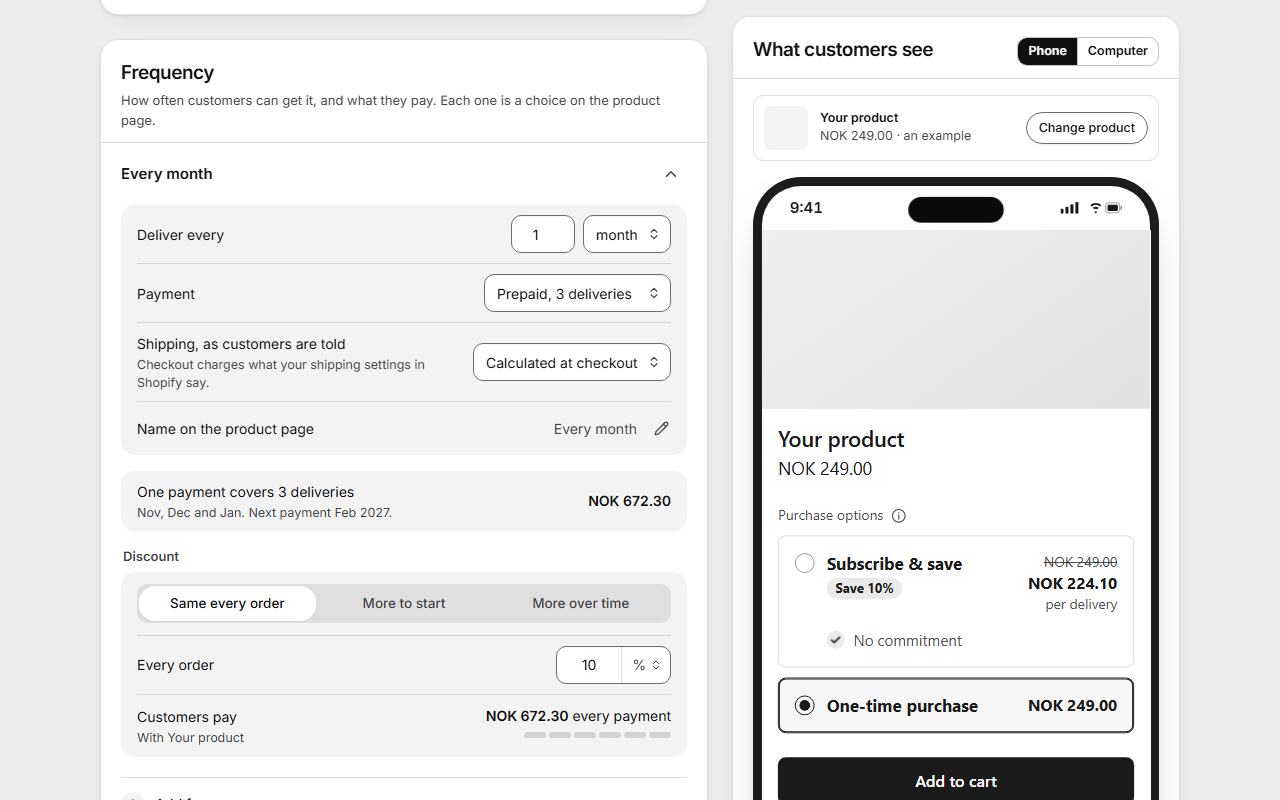
Under the settings, One payment covers 3 deliveries shows what one payment costs, the deliveries it covers counted from today, and when the next payment comes.
What the customer sees
When the customer chooses a prepaid option on the product page, the widget shows a short summary: what they pay "Today" and for how many deliveries, how often it is "Delivered", what it costs "Then", and "Shipping". In the plan editor, the closed line starts with "Prepaid, 3 deliveries", followed by the discount.
Good to know
- On a prepaid frequency, Shopify counts a discount per payment. "The first 3 orders" means the first 3 payments.
- The shipping choice only decides what customers are told. Checkout charges what your shipping settings in Shopify say, so make the two agree. See Shipping for subscriptions.
- Shopify splits a prepaid payment into its deliveries itself. One delivery of a prepaid subscription can't be changed on its own, so there are no extra products, gifts, shelf items or product swaps on it.
- Prepaid plans aren't offered as a switch to subscription in the cart, because they change what is paid today by more than a cart line can explain.
- Starter kits, sold-out rules, the routine discount and the discount on the last payment attempt don't apply to prepaid subscriptions.
- Next 90 days under Analytics doesn't count prepaid subscriptions, because their plan holds the dates they pay and not the dates they ship. The page says how many to order for on top.
- When shipping for subscriptions changes, prepaid subscriptions keep what they have until the period they paid for is over.