Norse Subscriptions help
Cancellation, reasons and offers
Set what customers are asked and offered before they cancel, and see who stayed.
Customers can cancel in the portal without writing to you. Before they confirm, the cancel step can ask why, and offer one thing that fits the reason: a discount, a pause, a skip, another product or a longer rhythm. You set this under Customer experience > Cancellation, where you also see who stayed.
Before you start
- Customers cancel in the portal only when Allow cancellation in the portal is on. It is under Customer experience > Customer portal, in the Cancelling row. When it is off, customers ask you instead.
- Offers and “Before you go” are part of Growth. On other plans, the cancel step asks its reasons and cancels, with no offer.
Set up the offers
- Open Customer experience > Cancellation.
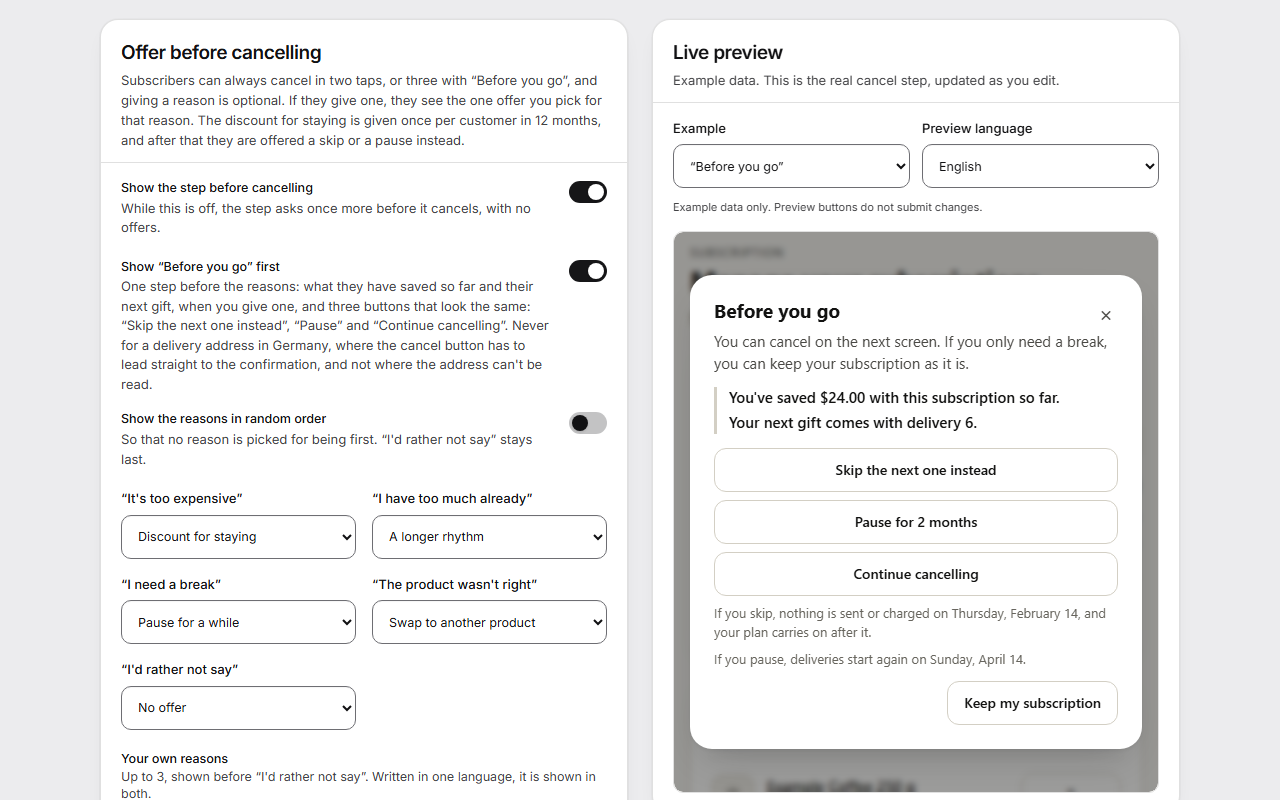
- Under Offer before cancelling, turn on Show the step before cancelling.
- For each reason, choose an offer: Discount for staying, Pause for a while, Skip the next delivery, Swap to another product, A longer rhythm or No offer. Don't ask about this hides a reason.
- For the discount, set Discount percent and Number of deliveries. If you leave them empty, the customer's choice reaches you as a request instead. Discount offer wording replaces the default words.
- If you want, turn on Show “Before you go” first and Show the reasons in random order.
- Press Save changes.
The Live preview shows the real cancel step as you edit. Choose what it shows under Example.
Add your own reasons
- Under Your own reasons, press Add a reason. You can add up to three.
- Write the reason In English, In Norwegian, or both. Written in one language, it is shown in both.
- Choose its Offer, and press Save changes.
Give one plan its own offers
For a product with a thin margin, you may want other offers. Under Other offers for one plan, press Add a plan, choose the plan, and set its offers. Same as above keeps the general offer for that reason.
What the customer sees
The customer presses “Cancel subscription”. The step “Cancel your subscription” says “You can cancel right away. Telling us why is optional.” Under “Why are you cancelling? (optional)” are the reasons, with “I'd rather not say” last. A reason with an offer shows that offer. The customer confirms with “Cancel subscription” or keeps it with “Keep my subscription”, and is told “You'll get a written confirmation.”
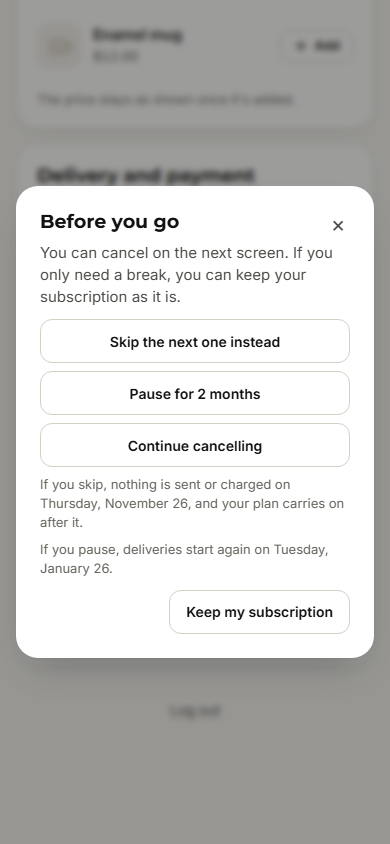
With “Before you go” on, one step comes first: what they have saved so far, their next gift if you give one, and three equal buttons: “Skip the next one instead”, a pause such as “Pause for 2 months”, and “Continue cancelling”.
Good to know
- The first press on “Cancel subscription” always opens the step, so one stray press never ends a subscription. With the step off, it asks once more and has no offers.
- The written confirmation of a cancellation always goes out, also when customer emails are off.
- “Before you go” is never shown for a delivery address in Germany, where the cancel button must lead straight to the confirmation. It is also left out for local pickup, where the address can't be read, and when the customer came through an email link.
- The discount for staying is given once per customer in 12 months, across their subscriptions. After that, they are offered a skip or a pause instead.
- If you set Deliveries before they can cancel in the Cancelling row on Customer portal, say the same in your cancellation policy. Rules for consumers in Norway and the EEA can limit what you may require. This is not legal advice.
- The last 30 days at the top shows how many opened the cancel step, how many stayed and which offers were taken. See why they leave opens Analytics.